

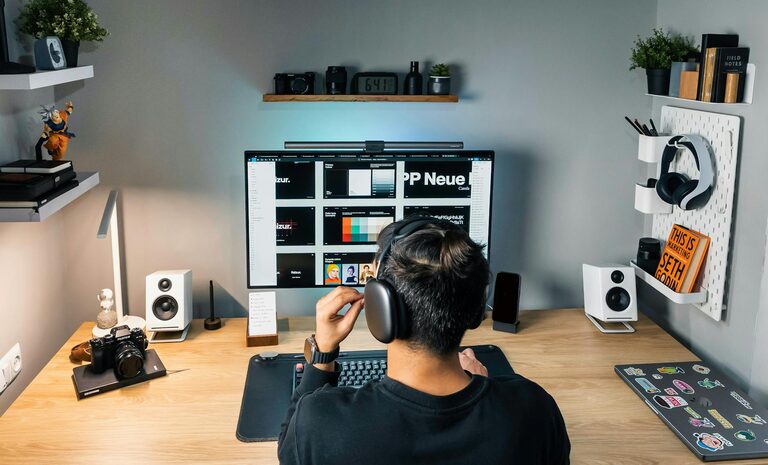
Working from home has become a common part of many people’s routines. Having a dedicated, well-designed workspace can make a huge difference to how productive and comfortable you feel throughout your day. Whether you’re telecommuting, freelancing, or simply need a spot for occasional tasks, creating an environment that supports focus and ease is key.
In this post, we’ll explore practical tips to help you set up a home workspace that benefits both your productivity and wellbeing.
Choose the Right Location
Find a Quiet, Distraction-Free Spot
Start by selecting a space in your home that is relatively quiet and free from regular interruptions. If possible, avoid areas with high foot traffic or noisy appliances. Having a designated workspace signals to your brain that it’s time to focus.
Consider Natural Light and Ventilation
Position your desk near a window to take advantage of natural daylight, which can improve mood and alertness. Good airflow is also important; fresh air helps prevent fatigue and keeps your mind sharp.
Invest in Ergonomic Furniture
Select a Supportive Chair
Comfortable seating reduces the risk of back pain and other aches. Choose a chair with adjustable height, good lumbar support, and cushioning suited to long periods of sitting.
Use a Proper Desk
The desk should be at a comfortable height so your arms can rest naturally when typing or writing. Avoid overly cluttered surfaces and opt for sufficient space to keep essentials organised.
Optimise Your Desk Setup
Keep Essentials Within Reach
Arrange your most-used tools, such as a computer, notebook, and pens, within easy reach to minimise unnecessary movement and interruptions.
Manage Cables and Accessories
Use cable organisers or clips to keep wires tidy and reduce clutter. A clean workspace helps keep your mind clear and focused.
Incorporate Technology Wisely
Make sure your computer, phone, and other devices are set up to facilitate your workflow. Use noise-cancelling headphones if you are in a shared area to block out distractions.
Control Lighting and Colour
Balance Lighting Levels
Combine natural light with adjustable artificial lighting. A desk lamp with adjustable brightness can help reduce eye strain during darker hours or overcast days.
Choose Calm, Soothing Colours
Soft, neutral colour tones on walls and décor can create a relaxing atmosphere that supports concentration. Avoid overly bright or distracting patterns near your workspace.
Maintain Organisation and Cleanliness
Use Storage Solutions
Drawers, shelves, or organisers keep documents and supplies neatly stored. Regularly decluttering your space helps maintain focus and reduces stress.
Establish a Cleaning Routine
Set aside time weekly to tidy your workstation, wipe surfaces, and organise cables. A clean space feels welcoming and motivates you to work.
Personalise Your Workspace
Add Meaningful Décor
Incorporate plants, artwork, or photos that inspire you without overwhelming the space. Greenery can boost mood and purify the air naturally.
Include Comfort Items
A cushion for your chair, a footrest, or a soft throw can add comfort for long working hours, helping you feel settled and supported.
Set Boundaries and Routine
Define Work Hours
Even in a home setting, it’s important to establish clear start and finish times to prevent burnout and maintain balance.
Communicate Your Workspace Needs
If you share your home with family or flatmates, let them know your work schedule and the importance of keeping your workspace undisturbed.
Take Regular Breaks
Move and Stretch
Changing posture and moving every hour reduces physical strain and refreshes your mind.
Step Outside When Possible
A few minutes outdoors during breaks can boost energy and concentration when you return to work.
—
Creating a home workspace that focuses on comfort and productivity is an investment in your daily wellbeing and success. By thoughtfully choosing your space, furniture, lighting, and organisation methods, you can craft an environment that supports both focus and relaxation. Remember that small changes can make a big difference, so start with a few adjustments and build your ideal workspace over time.